
Setting the max number of teams that can register
It is possible to set the maximum number of teams you want to accept into each category. Once the maximum is reached, teams can still register, but they are informed by email that the category is full and that they are on the waiting list.
They are also told that they will be put on the waitlist as the category is full when they are entering their details.
To set (or change) the maximum number of teams for each category, follow these instructions:
- Left menu: Tournament
- Top menu: Registrations
- At the bottom of the page, you will find the list of categories.
- Under the column Max no. of teams, enter the number for each category.
-
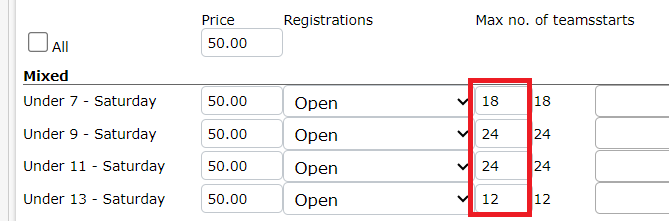
On the right side is displayed the number of teams registered in the category.
-
- If there is no maximum, leave the max number set to 0, which means no limit.
You can check (and edit) the content of the email they will receive when they sign up to a category that is full at the following link:
https://torneopal.helpscoutdocs.com/article/21-editing-text-for-registrations